
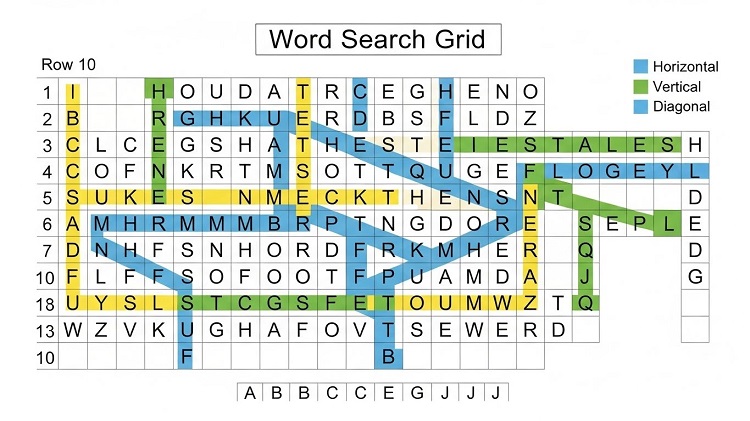
Word search puzzles may look simple at first glance, but anyone who has spent more than a few minutes stuck on a single hidden word knows how challenging they can be. Letters run horizontally, vertically, diagonally, and even backwards, making it easy to miss obvious answers. This is where a word search solver becomes incredibly useful.
A word search solver is a tool or method that helps you quickly locate hidden words inside a grid of letters. Whether you are a student trying to complete homework, a teacher preparing learning material, a casual puzzle lover, or a tech-savvy user looking for smart tools, word search solvers save time and reduce frustration. Modern solvers even allow you to upload images, scan puzzles using OCR, and instantly highlight answers.
In this detailed guide, you will learn what a word search solver is, how it works, the best online tools available, manual solving strategies, educational uses, and even how to build your own solver. This article is designed to answer every major user intent related to word search solvers, while keeping the explanation clear, practical, and beginner-friendly.
What Is a Word Search Solver?
Definition and Purpose
A word search solver is a tool or technique used to find specific words hidden in a letter grid. Instead of manually scanning each row and column, the solver systematically searches the grid and identifies the exact position of each word.
These solvers can be:
- Online tools
- Mobile apps
- Algorithms used in software
- Manual strategies followed by humans
What Problems Does It Solve?
Word search solvers help when:
- The grid is very large
- Words are hidden diagonally or backwards
- Time is limited
- Accuracy is important
- The puzzle is part of an educational or professional task
Why People Use Word Search Solvers
People use word search solvers to:
- Save time
- Avoid frustration
- Check answers
- Improve learning efficiency
- Solve complex puzzles instantly
How Word Search Puzzles Work
Basic Puzzle Structure
A word search puzzle consists of:
- A grid of letters
- A list of words to find
- Words hidden in multiple directions
Word Directions Explained
Most puzzles allow words to appear in:
- Left to right
- Right to left
- Top to bottom
- Bottom to top
- Diagonally (both directions)
According to common puzzle standards, professional solvers check all 8 directions .
Types of Word Search Puzzles
- Classic word search
- Themed puzzles (science, animals, history)
- Educational puzzles
- Shape-based word searches
Types of Word Search Solvers
Manual Solving Techniques
Manual solving relies on:
- Scanning rows first
- Looking for rare letters
- Marking found words
- Eliminating used letters
This method improves concentration but can be slow for large grids.
Online Word Search Solvers
Online solvers allow users to:
- Enter the grid letters
- Paste the word list
- Instantly see highlighted answers
Web-based solvers are the most popular choice today.
Image and OCR-Based Solvers
Advanced solvers use OCR (Optical Character Recognition) to:
- Scan puzzle images
- Extract letters automatically
- Solve without manual typing
These tools are ideal for printed puzzles or books.
How Online Word Search Solvers Work
Grid Input and Parsing
The solver first converts the grid into a matrix of characters. Each cell is stored with coordinates.
Search Algorithms Used
Most solvers use:
- Brute force scanning
- Pattern matching
- Backtracking algorithms
Each word is checked against all possible directions until a match is found.
Result Highlighting
Once a word is found, the solver:
- Marks starting and ending letters
- Highlights the word path
- Displays coordinates or visual lines
Best Online Word Search Solver Tools
WordUnscrambler Word Search Solver
- Free
- No signup required
- Supports large grids
- Beginner-friendly interface
SolveWordSearch
- Supports image upload
- Uses OCR
- Mobile-friendly
WordFinder Tools
- Multi-word game support
- Educational resources
AI-Based Solvers
Some platforms use AI to:
- Predict missing letters
- Handle unclear grids
- Improve OCR accuracy
Step-by-Step: How to Use a Word Search Solver
Step 1: Enter the Grid
Type or paste the grid letters row by row.
Step 2: Enter the Word List
Input the words exactly as given.
Step 3: Choose Directions
Select whether words may appear diagonally or backwards.
Step 4: Solve and Review
Click solve and review highlighted answers.
Manual Strategies to Solve Word Search Faster
Start with Unique Letters
Words containing Q, Z, X, or J are easier to locate.
Scan Horizontally First
Most puzzles hide words left to right.
Look for Word Endings
Suffixes like -ING, -TION, or -ED are easy to spot.
Use Elimination
Cross out found words to reduce visual clutter.
Educational Uses of Word Search Solvers
Vocabulary Building
Word searches reinforce spelling and word recognition.
Classroom Efficiency
Teachers use solvers to:
- Create answer keys
- Verify puzzle accuracy
- Save preparation time
Language Learning
Solvers help students:
- Learn new words
- Practice foreign languages
- Improve reading speed
Advanced Features in Modern Solvers
Wildcards and Pattern Filters
Some tools allow:
- Unknown letters using symbols
- Pattern-based searching
Multi-Language Support
Advanced solvers support:
- Spanish
- French
- German
- Custom alphabets
Accessibility Features
- Screen reader compatibility
- High-contrast modes
- Mobile optimization
Common Challenges and Solutions
OCR Errors
Solution: Use clear images and good lighting.
Large Grids
Solution: Use automated solvers instead of manual scanning.
Similar Letter Confusion
Solution: Zoom in and double-check grid accuracy.
Building Your Own Word Search Solver
Basic Algorithm Concept
- Store grid in a 2D array
- Loop through each cell
- Check all 8 directions
- Match letters sequentially
Programming Languages Used
- Python
- JavaScript
- Java
- C++
OCR Integration
Libraries:
- Tesseract OCR
- OpenCV
- Google Vision API
Best Practices for Faster Solving
- Practice pattern recognition
- Use both manual and digital methods
- Start with long words
- Avoid random scanning
Word Search Solvers and Brain Training
Word search puzzles improve:
- Focus
- Memory
- Visual scanning
- Vocabulary retention
They are often recommended in cognitive training programs.
Quick Takeaways
- A word search solver finds hidden words instantly
- Supports all directions and puzzle types
- OCR solvers work with images
- Useful for students, teachers, and puzzle lovers
- Improves accuracy and saves time
- Can be built using simple algorithms
Conclusion
Word search puzzles are more than just a fun pastime. They sharpen the mind, strengthen vocabulary, and improve visual recognition skills. However, when puzzles become complex or time-consuming, a word search solver is the perfect solution. From simple online grid solvers to advanced OCR-based tools, modern technology has made word search solving faster and more accessible than ever.
Whether you are a student completing assignments, a teacher preparing materials, a casual puzzle enthusiast, or a developer exploring algorithms, word search solvers offer practical value. By combining manual strategies with smart tools, you can enjoy puzzles without frustration while improving your problem-solving skills.
If you want speed, accuracy, and confidence, using a reliable word search solver is the smartest way forward.
Frequently Asked Questions
1. What is the best free word search solver?
WordUnscrambler and SolveWordSearch are among the most reliable free tools.
2. Can a word search solver work from an image?
Yes, OCR-based solvers can scan images and extract letters automatically.
3. Are word search solvers safe to use?
Most reputable solvers do not store user data and are safe for educational use.
4. Do solvers work for large grids?
Yes, automated solvers handle large grids better than manual methods.
5. Can I build my own word search solver?
Yes, using basic programming logic and search algorithms.